TSTool / Software Design / Plugins / Plugin Commands
Introduction
Code for plugin commands should follow normal TSTool command conventions. The following indicates typical code organization for commands (in this case the plugin has multiple commands).
Note that a plugin is not required to provide commands. However, implementing a plugin datastore (see the Plugin Commands) without commands to read from the datastore would have little value. Some plugins implement only commands without datastore integration.
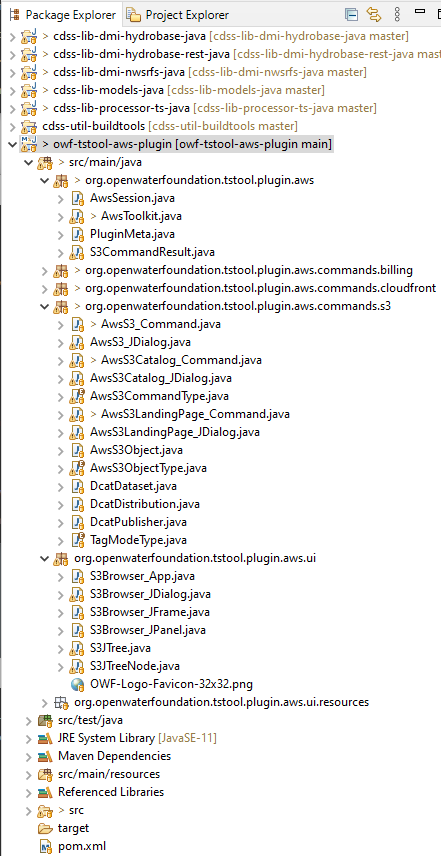
Eclipse Package Explorer (see full-size image)
Plugin Metadata
Plugin metadata are typically stored in a file PluginMeta.java in the main source folder, as shown in the following example.
The VERSION string is used by the build script.
As of TSTool version 15, the resources/META-INF/MANIFEST.MF file in the plugin jar
file can also be used to provide plugin metadata because it can be accessed without loading the jar file class.
// PluginMeta - metadata for the plugin

/* NoticeStart

OWF TSTool AWS Plugin
Copyright (C) 2022-2024 Open Water Foundation

OWF TSTool AWS Plugin is free software:  you can redistribute it and/or modify
    it under the terms of the GNU General Public License as published by
    the Free Software Foundation, either version 3 of the License, or
    (at your option) any later version.

OWF TSTool AWS Plugin is distributed in the hope that it will be useful,
    but WITHOUT ANY WARRANTY; without even the implied warranty of
    MERCHANTABILITY or FITNESS FOR A PARTICULAR PURPOSE.  See the
    GNU General Public License for more details.

You should have received a copy of the GNU General Public License
    along with OWF TSTool AWS Plugin.  If not, see <https://www.gnu.org/licenses/>.

NoticeEnd */

package org.openwaterfoundation.tstool.plugin.aws;

public class PluginMeta {
        /**
         * Plugin version.
         */
        public static final String VERSION = "1.5.7 (2024-12-15)";

        /**
         * Get the documentation root URL, used for command help.
         * This should be the folder in which the index.html file exists, for example:
         *          https://software.openwaterfoundation.org/tstool-aws-plugin/latest/doc-user/
         */
        public static String getDocumentationRootUrl() {
                // Hard code for now until figure out how to configure in the META.
                String url = "https://software.openwaterfoundation.org/tstool-aws-plugin/latest/doc-user/";
                return url;
        }
}
Command Classes
Command classes are typically located in a commands folder as per the above figure.
There is typically a class to initialize and run the command (e.g., AwsS3.java),
and a class to provide the command editor (e.g., AwsS3_JDialog.java).
Additional local classes may be uses as needed.
TSTool is made aware of the command classes using the
resources/META-INF/MANIFEST.MF file in the plugin jar file.
See the Plugin Packaging and Installation
documentation for information about configuring the command to run in TSTool.