TSTool / Command / SetInputPeriod
Overview
The SetInputPeriod command sets the period used for reading time series data from files and datastores.
The default in most cases is to read/query all available data so that all data are available for analysis and data filling.
However, a shorter period may be desirable to increase performance (e.g., when processing real-time data)
or to force matching a historical period.
It may be necessary to set the input period if the default for a datastore is very short.
See also the SetOutputPeriod command.
- If one or both parameters are provided, only the specified parameter is set (a single unspecified parameter does not cause the other value to be unset).
- If the command is called with no parameters, both
InputStartandInputEndproperties are set to null and defaults will be used for commands that follow. - Use a combination of commands to set/unset start and end, as needed.
Command Editor
The command is available in the following TSTool menu:
- Commands / Read Time Series
The following dialog is used to edit this command and illustrates the syntax of the command.
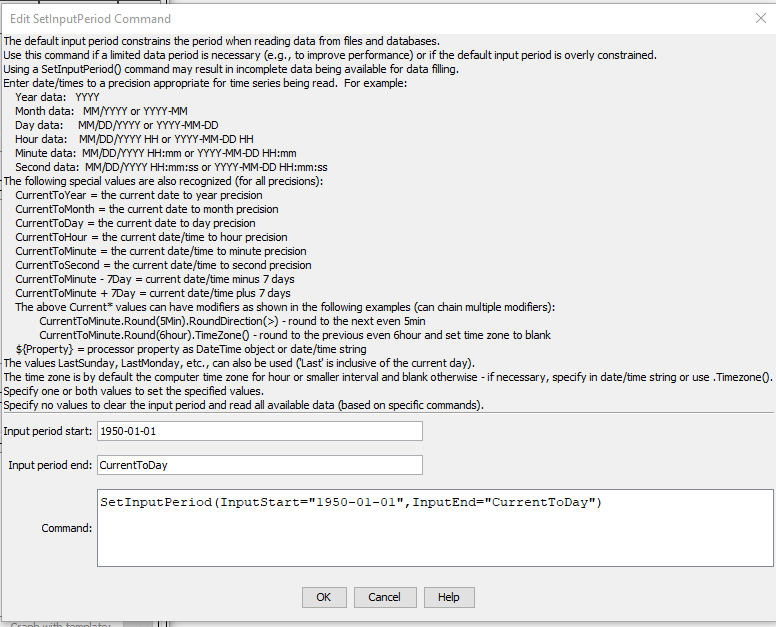
SetInputPeriod Command Editor (see full-size image)
Command Syntax
The command syntax is as follows:
SetInputPeriod(Parameter="Value",...)
Command Parameters
| Parameter | Description | Default |
|---|---|---|
InputStart |
The date/time to start reading/querying time series data, one of:
|
If not specified:
|
InputEnd |
The date/time to end reading/querying time series data. See the description for InputStart. |
If not specified:
|
The CurrentToYear and other special date/time values can be followed by modifiers,
which can be chained together in any order.
For example, the following will adjust the current time rounded to 5 minutes into the future and set the time zone to blank:
CurrentToMinute.Round(5min).RoundDirection(>).TimeZone()
CurrentTo* Modifiers
| Modifier | Description |
|---|---|
Round(interval) |
Round the current date/time to the specified interval (e.g., 5min, 6hour). No rounding occurs if the current date/time exactly matches the requested rounding interval. The default is to round back but see the RoundDirection() modifier. |
RoundToDayOfWeek(Day) |
Round the current date/time to the specified day of the week (Monday, Tuesday, Wednesday, Thursday, Friday, Saturday, or Sunday). The day is rounded and the month and year are adjusted accordingly. No rounding occurs if the current date/time matches the requested day of the week. The default is to round back but see the RoundDirection() modifier. |
RoundDirection(<)RoundDirection(>) |
Indicate which way the Round() modifier should round the date/time, one of:
|
TimeZone(tzToSet) |
Set the time zone for the date/time to the specified time zone string. This does not shift the time value. It simply assigns the time zone string. Blank (no value) can be used to set the time zone to blank. Note that other commands may handle time zone in a specific way, for example when reading and writing data. |
Examples
See the automated tests.
Troubleshooting
See the main TSTool Troubleshooting documentation.
See Also
SetOutputPeriodcommandSetOutputYearTypecommand