TSTool / Command / SetTableValues
Overview
The SetTableValues command sets values in a table.
It does so by:
- First match rows by filtering on column values (see
ColumnFiltersparameter). The default if no filters are specified is to match all rows. - Set values in specified columns:
- If
ColumnValuesparameter is specified, set one or more column values. - If
ColumnandValueparameters are specified, set a single column's values. This form is used when theColumnValuessyntax is complicated, such as when a column containing array is modified.
- If
This command can be used to set or override table values that were not included in the original data.
See also the FormatTableString and
ManipulateTableString commands.
Command Editor
The command is available in the following TSTool menu:
- Commands(Table) / Manipulate Table Values
The following dialog is used to edit the command and illustrates the syntax of the command.
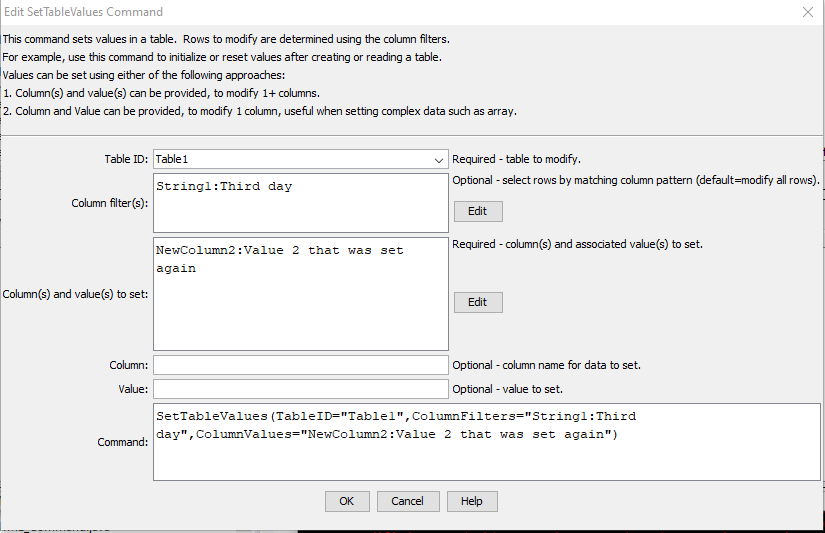
SetTableValues Command Editor (see full-size image)
Command Syntax
The command syntax is as follows:
SetTableValues(Parameter="Value",...)
Command Parameters
| Parameter | Description | Default |
|---|---|---|
TableIDrequired |
The identifier for the table being modified. Can be specified using ${Property} notation. |
None – must be specified. |
ColumnFilters |
Filters that limit the number of rows being modified, using the syntax:FilterColumn1:FilterPattern1, FilterColumn2:FilterPattern2Patterns can use * to indicate wildcards for matches. Only string values can be checked (other data types are converted to strings for comparison). Comparisons are case-independent. All patterns must be matched in order to match the row. The parameter can be specified using ${Property} notation. |
Process all rows in the table. |
ColumnValues |
The column names and corresponding values to set using syntax:ColumnName1:Value1, ColumnName2:Value2The column name and value parts can be specified using ${Property} notation. |
|
Column |
The column name to set a single value, can use ${Property} notation. A corresponding Value must be provided. |
|
Value |
The value to set, can use ${Property} notation. Array values can be set using notation [value1,value2,value3...]. |
Examples
See the automated tests.
Troubleshooting
See the main TSTool Troubleshooting documentation.
See Also
FormatTableStringcommandManipulateTableStringcommand