TSTool / Command / SortTable
Overview
The SortTable command sorts rows and/or columns in a table:
- sort rows:
- specify one or more columns
- the column(s) to be sorted can be of type string, integer, double, float, or date/time.
- strings are sorted by ignoring case
- sort columns:
- specify one or more columns
- columns that are not sorted are shifted to the right side of the table
Command Editor
The command is available in the following TSTool menu:
- Commands(Table) / Manipulate Table Values
The following dialog is used to edit the command and illustrates the command syntax.
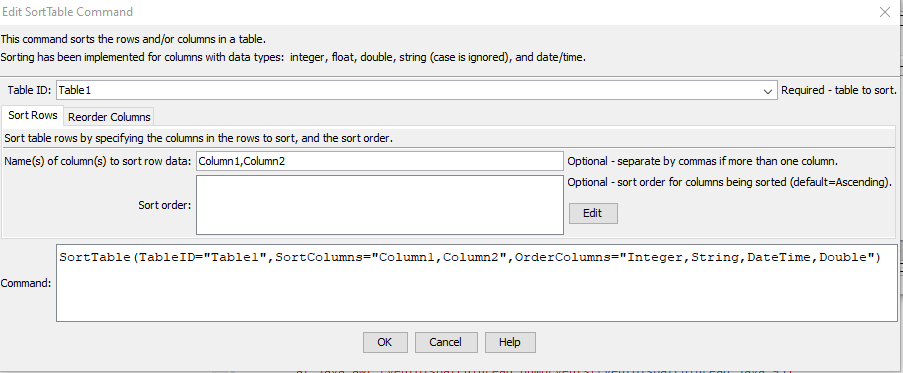
SortTable Command Editor for Row Sort Parameters (see full-size image)

SortTable Command Editor for Column Reorder Parameters (see full-size image)
Command Syntax
The command syntax is as follows:
SortTable(Parameter="Value",...)
Command Parameters
| Parameter | Description | Default |
|---|---|---|
TableID |
The identifier for the table. Can be specified using processor ${Property}. |
|
SortColumns |
When sorting rows, specify the names of columns to sort, separated by commas. | None – must be specified. |
SortOrder |
The sort order for columns specified by SortColumns, using the syntax:SortColumn1:Ascending,SortColumn2:DescendingAs indicated in the above example, the sort order must be specified as one of the following:
|
Ascending |
OrderColumns |
When reordering columns, specify the names of columns in the desired order, separated by commas. |
Examples
See the automated tests.
Troubleshooting
See the main TSTool Troubleshooting documentation.
See Also
NewTablecommand